
For Dealers
Professional LED tape lighting, sold direct to authorized dealers.
For professional installers and authorized dealers. Lighting Leaf products are sold only through authorized partners. We do not sell to or support DIY installation.
The Lighting Leaf Dealer Hub is our online ordering portal for authorized dealers and installers. Sign in to see your dealer pricing, order tape, power, controls and connectors, and quote jobs with our built-in design tools.
Why dealers choose Lighting Leaf
Lighting Leaf sells professional 24V LED tape lighting factory direct to authorized dealers.
Factory direct
Buy straight from the company that designs the system. Lighting Leaf sets no MSRP, so your margin is yours to set.
Easy online ordering
Sign in, see your own pricing, and order around the clock from one place. Every order ships with tracking.
Design tools built in
Find Your Light, the Installer Design Calculator and GreenPrint (beta) take you from a project idea to a complete parts list.
Support in one place
Datasheets, connector guides, ready-made kits and pro support live next to the products.
A complete system
Tape, quick-connect connectors, power and controls are designed to work together, with no soldering.
Inside the Dealer Hub
Sign in once and get your pricing, the full product line, design tools and support material in one place.
Dealer pricing
Your own dealer pricing on every product, shown only after you sign in.
Full catalog
LED tape by series, power supplies and drivers, controllers and remotes, connectors and ready-made kits.
Ready-made kits
Complete tape, power, controller and remote packages for common jobs.
Quick ordering
A quick order form and a cart that holds parts added from any tool.
Resources
Datasheets, a connector guide and installation help next to the products.
No password to remember
Sign in with your email address and a six-digit code we email you.
How to become a dealer
1
Apply
Tell us about your business and send a resale certificate. Every application is reviewed.
2
Get approved
Once approved, sign in to see your dealer pricing and payment options.
3
Order and ship
Order online any time. Every order ships with tracking.
Design tools
Lighting Leaf has four design tools. Find Your Light on this website is open to everyone; the other three open with a dealer login.
| Tool | Where | Who can use it | Best for |
|---|---|---|---|
| Find Your Light (website version) | lightingleaf.com | Anyone | A design-first start: choose by application and pictures |
| Find Your Light (dealer version) | Dealer Hub | Signed-in dealers | Three steps from parts selection to a complete, priced package |
| Installer Design Calculator | Dealer Hub | Signed-in dealers | A fast multi-zone quote with wire sizing, then the parts list added to the cart |
| GreenPrint (beta) | Dealer Hub | Signed-in dealers | Designing a full job on a floor plan, with a customer proposal and install packet |
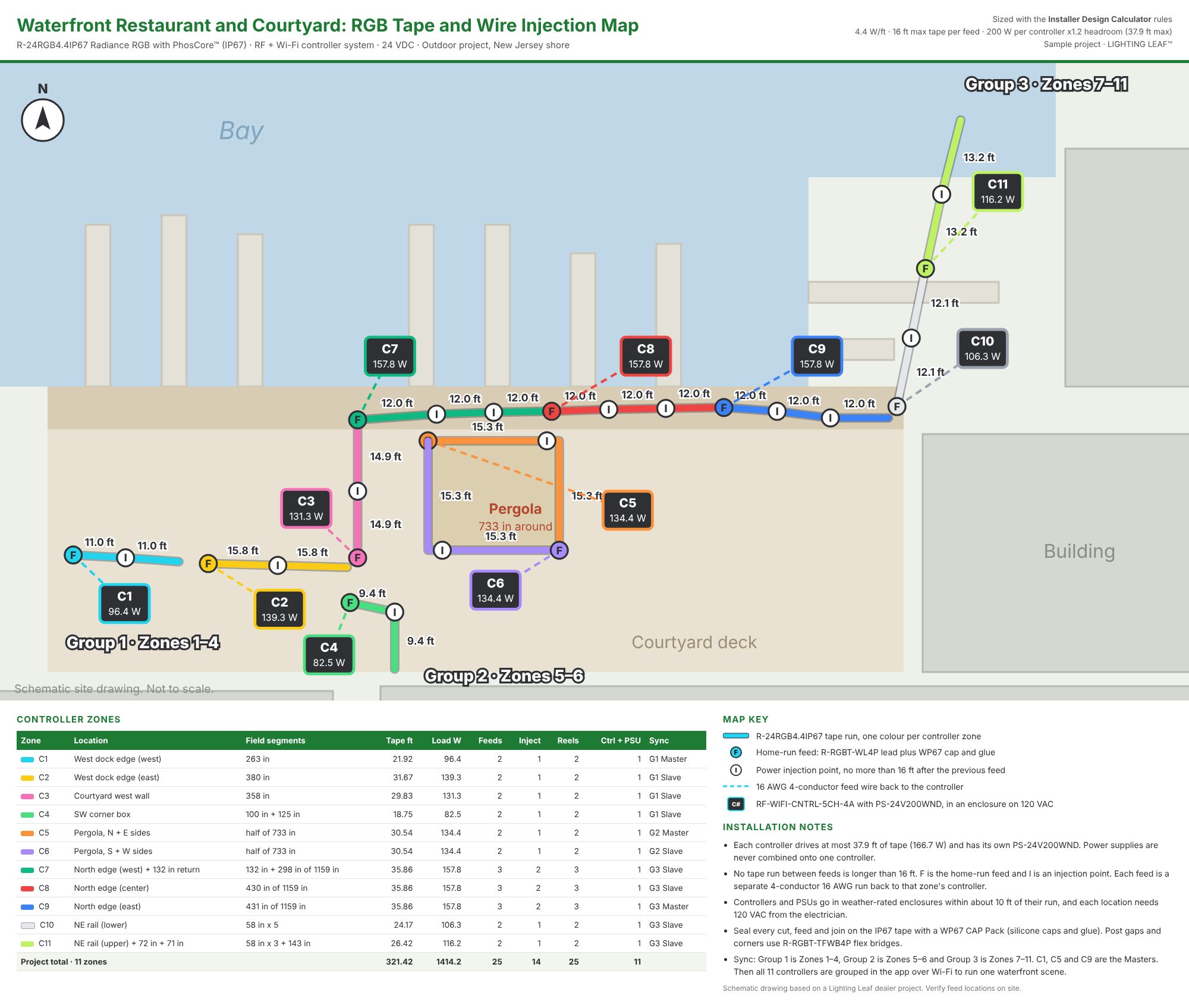
Installer Design Calculator example
An outdoor waterfront job: 11 RGB zones with every feed, injection point, controller and sync group mapped out.
GreenPrintBETA
GreenPrint is our design and system-builder tool for dealers. It turns a floor plan into a priced lighting design, a customer proposal and an install packet for your crew. It is free inside the Dealer Hub for every signed-in dealer.
Design on the plan
Upload a PDF plan set or a photo, set the scale, and draw each tape run where it goes.
Plan every zone
Pick the run shape, the tape series, the mounting height and the power supply location.
Size it right
GreenPrint routes the wire path, sizes the copper wire to keep voltage drop within 3%, and counts power supplies, controllers, connectors and remotes.
Quote two ways
Print a dealer quote PDF for you and a customer proposal PDF with your own markup.
Hand off to the crew
Print an install packet with the plan, wire map and parts by zone, plus wire labels.
Keep the job
Export to Excel, save a project file and reopen it later.
See a sample job
A GreenPrint install packet for a mock-up 3-bedroom plan: kitchen, island, owner’s bath and closet zones.
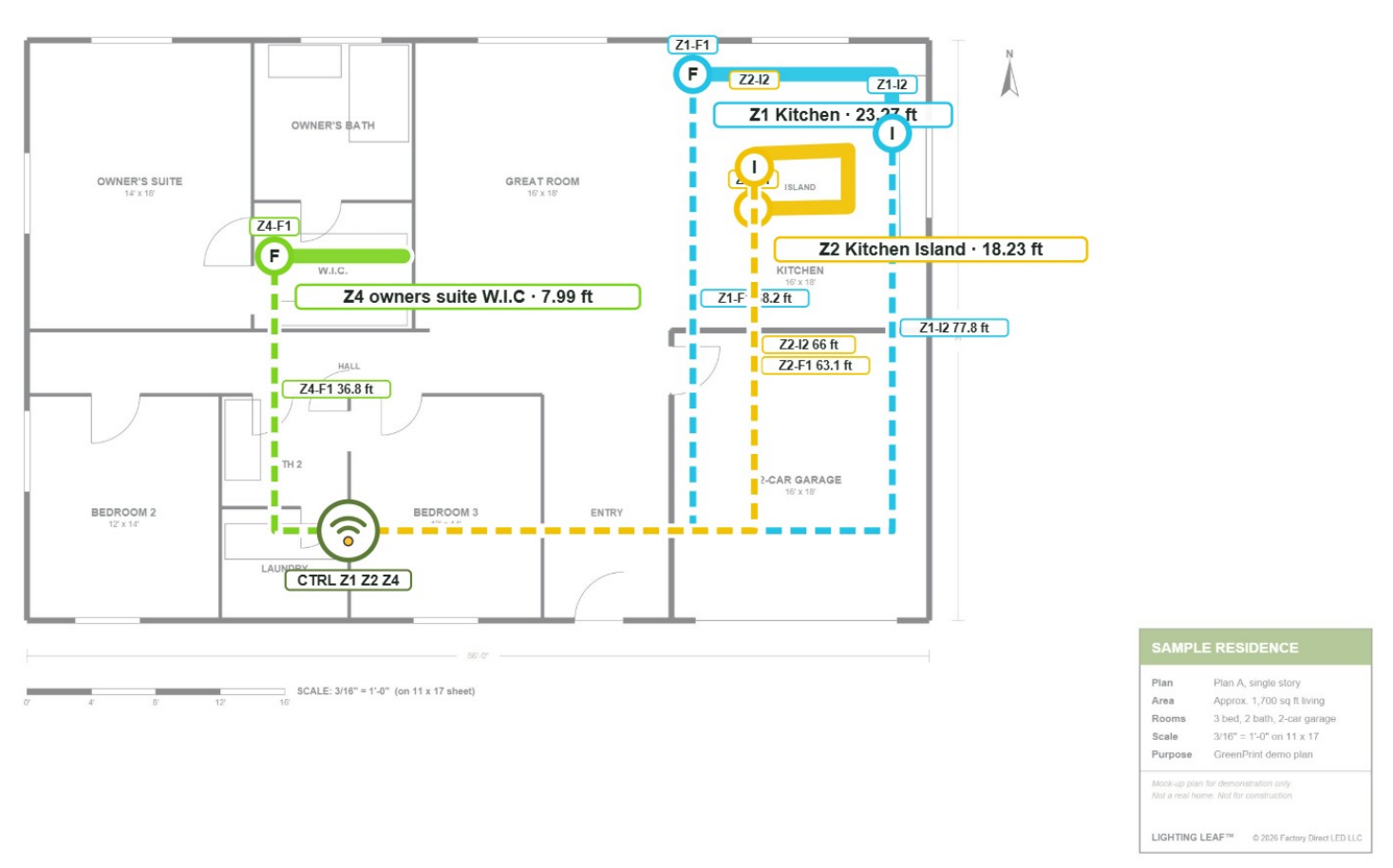
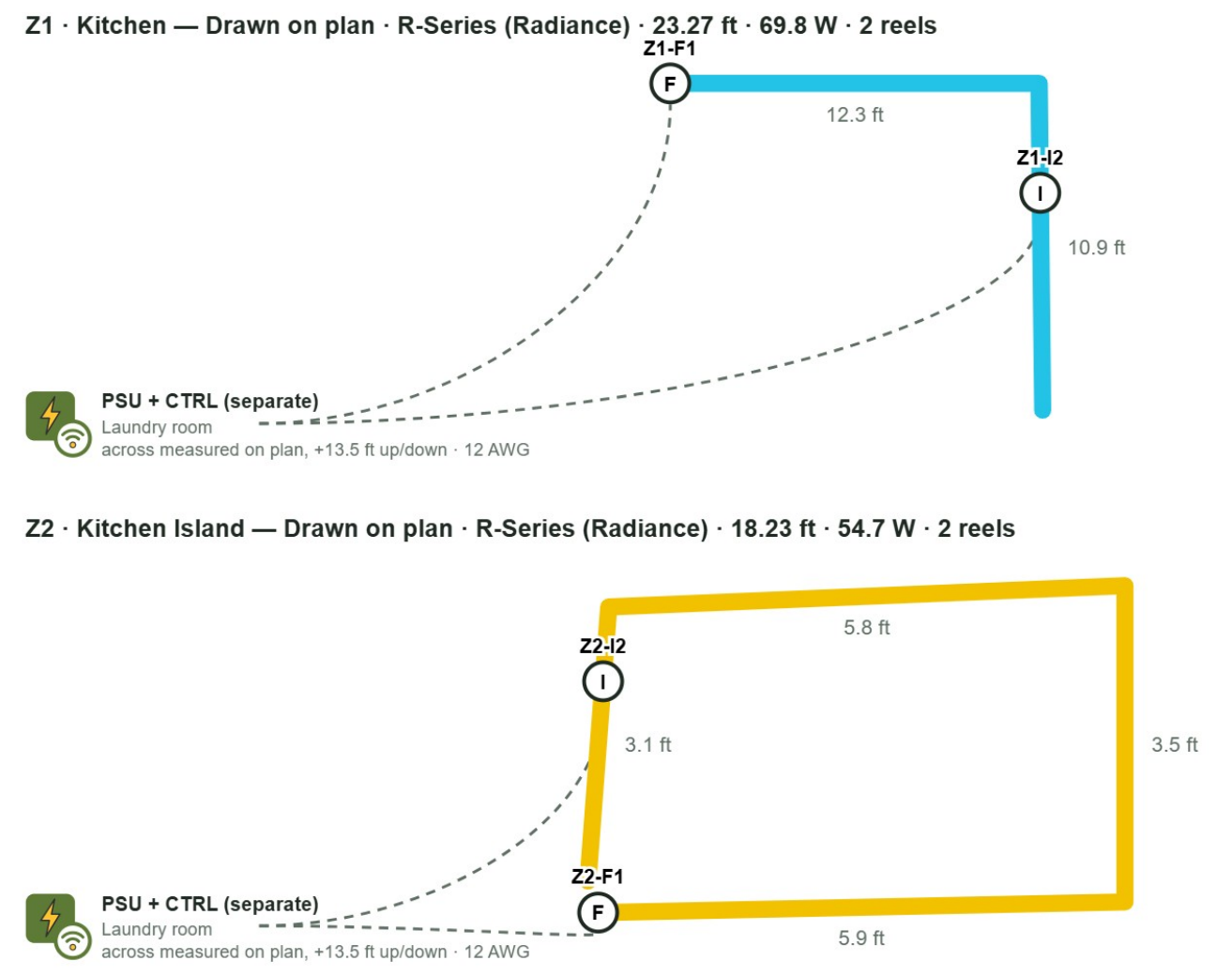
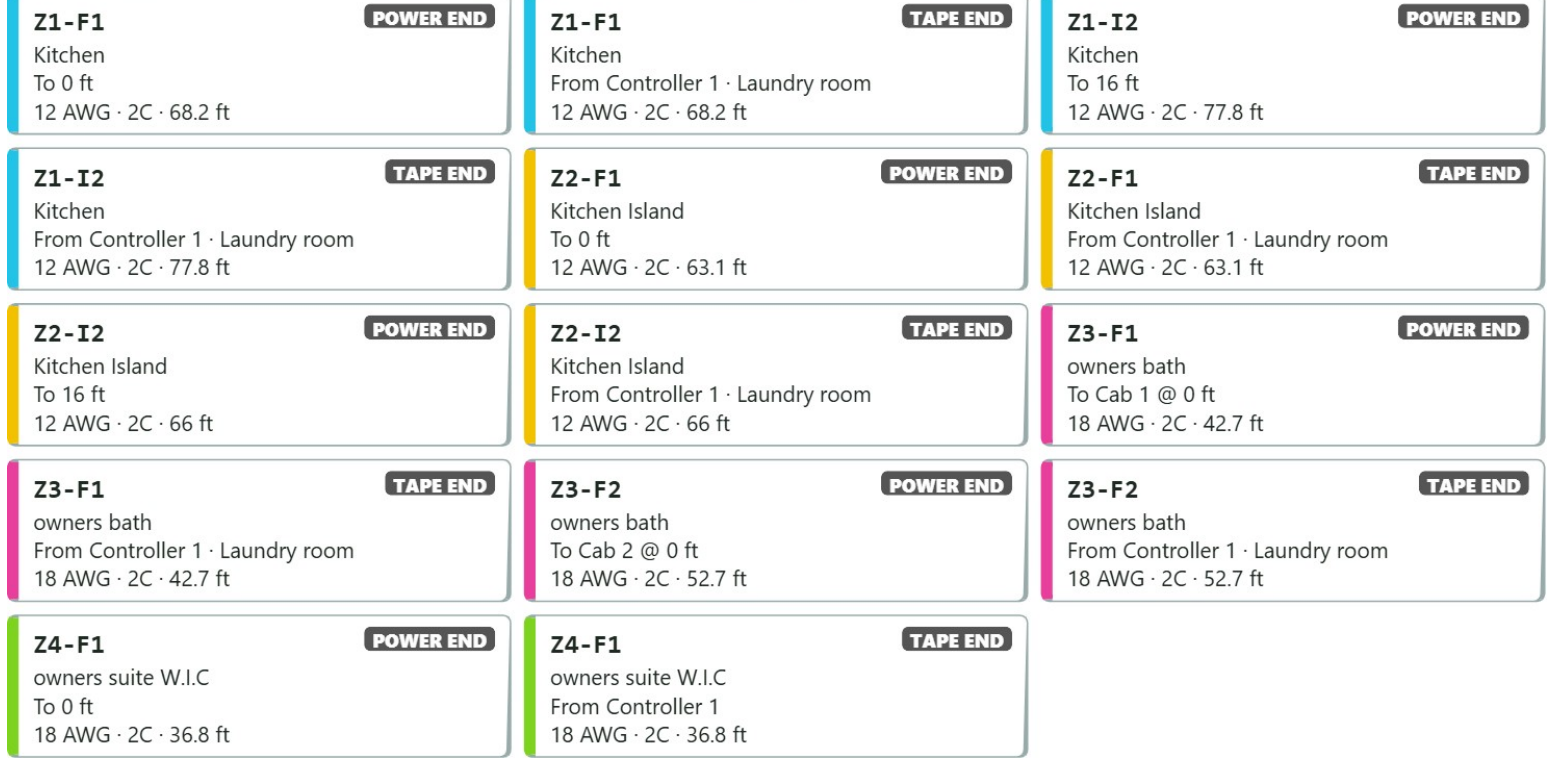
Mock-up plan for demonstration only. Click any image to enlarge.
Why 3% and not 5%? Our 24V Maximum Run Length Chart shows the longest run each wire size can feed before voltage drop reaches 5%, the point where the far end of the tape starts to look dimmer. Treat 5% as the ceiling. GreenPrint designs every run to a tighter 3% target for headroom, so it may pick a heavier wire gauge or a shorter run than the chart allows. Both are correct.
GreenPrint is in beta. Please double-check its results before quoting or ordering, and use the Send feedback button inside the tool to tell us what works.
Dealer FAQ
Who can use the Dealer Hub?
Authorized Lighting Leaf dealers and professional installers. Apply through our contact form, and once approved you can sign in and order.
Do I need a password?
No. You sign in with your email address and a six-digit code we email you.
Is there a suggested retail price?
No. Lighting Leaf sets no MSRP. You set your own margin.
What is GreenPrint?
A design tool inside the Dealer Hub that turns a floor plan into a priced design, a customer proposal and an install packet. It is in beta and free for every signed-in dealer.
Why does GreenPrint sometimes choose heavier wire than the run length chart?
The chart shows the maximum run at 5% voltage drop. GreenPrint designs to a tighter 3% so every run has headroom. Both are correct; GreenPrint just builds in more margin.
Can my customers use these tools?
Customers can use Find Your Light on lightingleaf.com. The Dealer Hub tools, including GreenPrint, show dealer pricing and are for dealers only.
Ready to work with Lighting Leaf?
Apply once, then order, design and quote from the Dealer Hub.
Become a DealerRequest Dealer Hub Access
Questions? Contact us or browse Resources.